We’re excited to share that our first UKG Ready payroll was successfully completed today, just after noon. This is a major milestone, and it truly would not have been possible without your dedication and flexibility.
Thank you for the time you’ve spent learning a new system, troubleshooting in real time, and keeping everything moving forward, all while navigating building closures and schedule disruptions. Your attention to detail and willingness to adapt made a huge difference, and we are incredibly grateful for the effort you’ve put in during this transition.
Building Closure – Pending
Reminder: HRIS will automatically add “Building Closure Leave” to timesheets. We plan adding this by the end of this week or early next week, depending on further closures.
Important for Supervisors and Timekeepers:
Working During Closure: Non-exempt employees who work while buildings are closed must still clock in and out.
No Action Needed: If Time Off (like annual/personal leave or sick leave) was already approved, no changes are required. We will be removing this leave before adding “Building Closure Leave.”
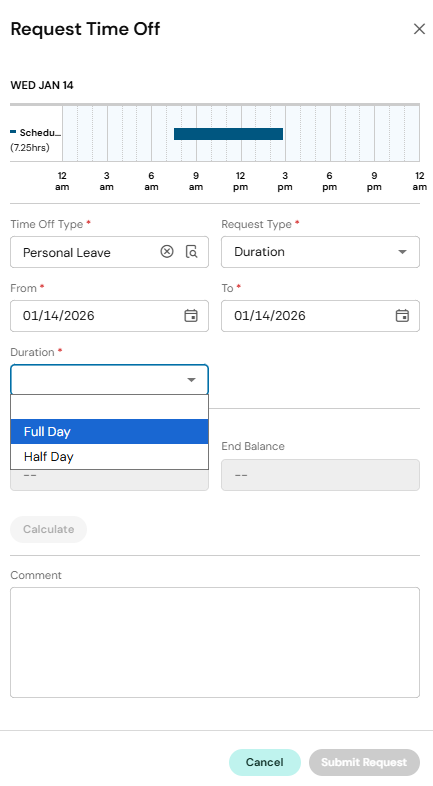
We have updated all 10/11 month EXEMPT employees to see only Full Day or Half Day on their Time Off Requests. See screenshot below for an example.
Timekeepers/Managers, we have added a column to your view of timesheets called “Time Off Duration”. If you need to edit a Time Off that has already been approved, you need to change the Duration in this column. If you edit the Raw hours, the underlying calculation will still run off the selected Time Off Duration (Full Day or Half Day)
Exempt Time Off Requests – Informational
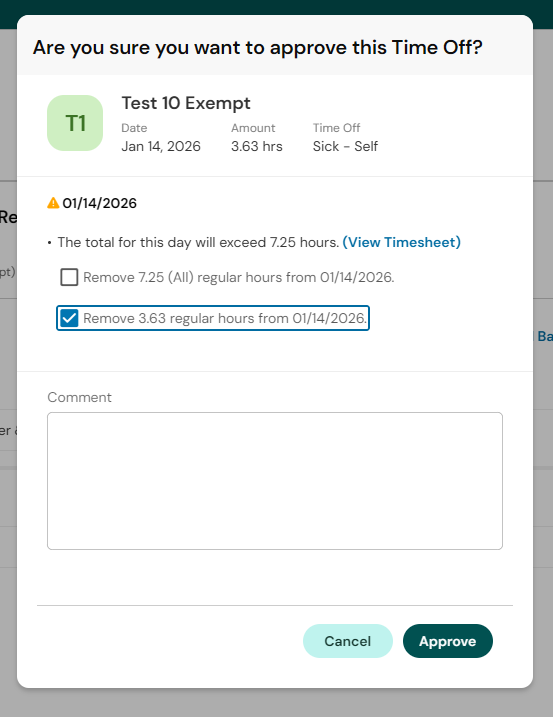
When approving a Time Off Request from an Exempt employee, click Approve, then on the pop-up box select “override the hours” for the appropriate number of hours before clicking Approve. This will replace the scheduled regular work for the day with the time off.
Employees Getting Locked Out – Informational
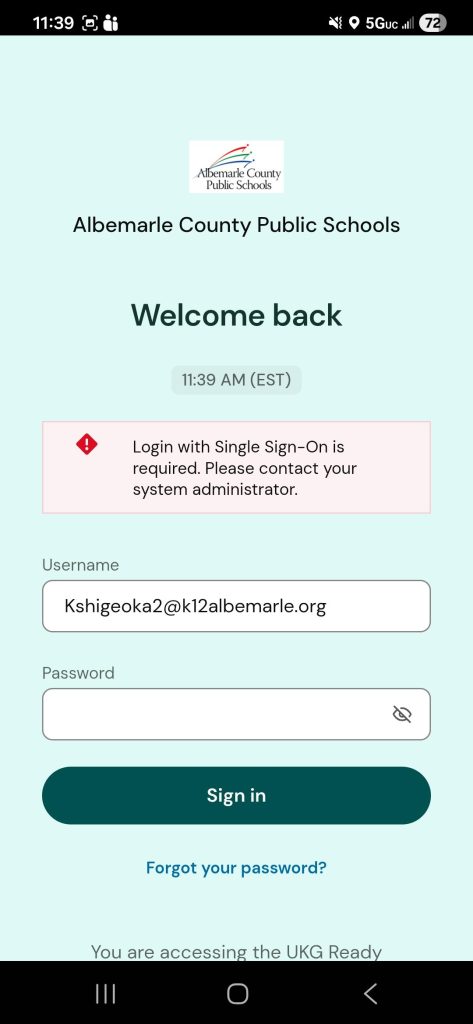
Employees who are reaching a Log in Page in the UKG Ready App that says “Welcome Back” (screenshot below) did not put the 6109280 as the Company Short Name on the very first install screen.
Solution – They need to uninstall the app and reinstall the app using the correct Company Short Name 6109280
Time Off from Schedule – Fixed
Non-Exempt employees who selected Full Day in a Time Off Request, the system was requesting the full schedule hours instead of the underlying workday schedule hours. This has been fixed.
HRIS will work to manually update leave that was submitted before this was fixed.
If the Department/Schools correct it directly to the timecard by re-entering the Raw Total to the Time Off Line, that is also fine
Example: Non-Exempt Employee works 8am – 5pm with a 1-hour lunch and submitted a Full Day of Annual Leave before this was fixed. Employee is seeing 9 hours of Annual Leave on their timesheet. Timekeeper/Manager can (or HRIS is in the process of correcting) change the Raw hours to 8 and hit Save to correct.
Leave Balances and Leave Submitted When Balances Not In – In Progress
We have identified the following issues and are working to correct them:
Sick Leave balances for Full Time, Non-Hybrid employees are being incorrectly capped at 720 hours
Sick Leave balances for Part-Time employees are being incorrectly capped
Sick Leave Overflow for the Grandfathered Hybrid Employees (impacting 6 people)
HRIS will manually switch leave that was submitted before balances were uploaded that are showing as LWOP – we are working to correct these.
If the Department/Schools correct it directly to the timecard by reselecting the relevant Leave Cascade, that is also fine
Example: Employee submitted 8 hours of Annual Leave before balances were in. Employee is seeing 8 hours of LWOP in lieu of Annual Leave on their timesheet. Timekeeper/Manager can (or HRIS is in the process of correcting) change the Time Off from LWOP in lieu of Annual Leave to Annual Leave and hit Save to retrigger the cascade.
If an employee comes to you saying that their leave balances are incorrect, please hold questions until next week while we work to correct these issues.
Additional Employee Access – Pending
All primary and backup timekeepers have access to their home and Sub Department.
We are still working on additional access for folks to their Location and those who may transfer into their location.
Completed– access to home department and substitute employees for Primary and Back-up Timekeepers
Pending – access to the home location and those who transfer into a location
Pending – access to those who manage specific Extra Duty selections
Work Schedules – Pending
We are working through the Rotating/Alternating Schedules/Compressed Workweeks that timekeepers have submitted to time@k12albemarle.org.
We will let you all know when those are in and available to use. If you have not yet sent us a rotating/alternative/compressed week schedule that is currently in use and needs to be built, please send it to time@k12albemarle.org.
FMLA / Worker’s Comp – Pending
We are still working on transferring current FMLA and Workers’ Comp cases from Legacy Kronos to UKG Ready. More information to come on how to handle these cases in UKG Ready.
Counter Distribution – Requesting Comp Time – Pending
We are working on the documentation for how employees will request Compensatory Time when they earn Overtime. This is only for Non-Exempt, Regular employees. Time worked over 40 hours that is not converted to Compensatory Time will automatically be paid out as Overtime.
Activities – Call Back, On Call – Pending
We are working on the documentation for how employees will request/designate on-call and call back. This is only for Non-Exempt, Regular employees. Primarily, only Building Services uses these functions. Ask your BP if you have questions about how On-Call or Call Back works.
UKG Ready Office Hours for Timekeepers – Reminder
We will be hosting an additional office hour session this week:
As always, feel free to contact time@k12albemarle.org with any questions if you are unable to make this session. We will have additional training and office hours next week – we will send an update once those dates/times are finalized.
As always, feel free to contact time@k12albemarle.org with any questions if you are unable to make either of these sessions.
Biometric Device Instructions
As you prepare to begin enrolling your employees into the biometric device at your school, HR recommends that you first register yourself to add an additional layer of security to your profile. To do this, follow the steps for “Enrolling an Employee” on the Biometric Device Registration user guide for yourself first. Following successful registration, the system will now require that you authorize your login to manager access with your biometric scan.
Once an employee is enrolled on a biometric device, they can use any biometric device in the Division. All Timekeepers, Backup Timekeepers, and Athletic OAs can enroll employees. Let us know at time@k12albemarle.org if you need additional managers enabled to enroll employees. HR is exploring if we can setup a biometric device at our office to host employees, particularly subs, to enroll through us.
Timesheet Update
We’ve moved the Location and Extra Duty fields on the timecards further left so you don’t have to scroll as much to see them.
Coming Soon: We are still working to identify the easiest reports you can run to gather the data at a glance.
Extra Duty Limit Lists
Extra Duty Limit Lists have been uploaded. Timekeepers and Managers can see all of the available Extra Duty options.
Coming Soon: We are working to update our process for timekeepers/managers to request additional Extra Duty options for employees.
Access to Additional Employees (Managed Cost Center Setup) – Pending
Right now only primary timekeepers and direct/indirect supervisors can see their employees.
Coming ASAP: We are working on updating your access to see additional employees (managed cost center setup).
Leave Request vs Time Off Request
We are updating our FAQs to clarify the difference between a Leave Request and a Time Off Request in UKG Ready, as we have seen some confusion between these options.
Time Off Requests should be used for all regular leave, including Sick, Personal, Annual/Vacation, and other standard leave types. These requests follow the normal supervisor approval process and ensure leave balances, timecards, and payroll are updated correctly.
Leave Requests are submitted through the Leave of Absence (LOA) module in UKG Ready and should be used only for formal, long-term leave situations such as FMLA, Workers’ Compensation, or similar extended leave cases. These requests are typically coordinated with the HR Leave Specialist and are not intended for routine absences.
For a 2-hour delay, employees will receive Building Closure Leave for any time they would normally be in the office during closures. Here are some examples:
If you work at an elementary school where the building typically opens at 7:30 AM and classes start at 7:45 AM, but today, due to the delay, the building opens at 9:30am and classes will begin at 9:45 AM. If your usual reporting time is 7:30 AM, today you should report by 9:30 AM and you will receive 2 hours of Building Closure Leave added to your timecard.
If you work at an elementary school where the building typically opens at 7:30 AM and classes start at 7:45 AM, but today, due to the delay, the building opens at 9:30am and classes will begin at 9:45 AM. If your usual reporting time is 8:30 AM, today you should report by 9:30 AM when the building opens and you will receive 1 hour of Building Closure Leave added to your timecard.
If you work at the County Office Building and your usual reporting time is 8:00 AM, you should report by 10 AM today. In this case, you will receive 2 hours of Building Closure Leave added to your timecard.
If you work at the County Office Building and your usual reporting time is 9:30 AM, you should report by 10 AM today. In this case, you will receive 30 minutes of Building Closure Leave added to your timecard.
If you have any questions or need further clarification, please don’t hesitate to contact time@k12albemarle.org or your Business Partner.