Counter Distribution – Requesting Comp Time – Updated / Informational
Converting Overtime (money) to Compensatory Time (leave) is done through a Counter Distribution. Employees who have overtime generated by the regular position (not the extra duty) will receive a Things To Do and an email letting them know they can request the overtime be converted to compensatory time. If the employee elects to convert the OT to Comp Time, it will enter an approval workflow to the ADP Manager and ADP Primary Timekeeper for Approval/Rejection. This procedure does not overwrite policy requirements around prior approval for overtime and compensatory time.
Timekeepers/Managers will not be able to submit this request on the employee’s behalf. If employees miss the Counter Distribution window, the Overtime will be paid out.
Please share the following instructions, UKG Ready_Timesheets, with your non-exempt employees as applicable. The relevant section is called Moving Compensatory Time.
Timesheet Metrics at the Top of Timesheets – Updated
We have updated the timesheet metrics at the top of timesheets. Explanation with Example below.
- Worked Hours – This is showing the total combined hours of work. This includes Regular Hours Worked, Overtime Hours Worked, Straight Time, and Extra Pay hours worked.
- Time Off Hours – This is showing the total combined Time Off hours. This includes Annual Leave, Sick Leave, Personal Leave, etc as well as Holiday, Non-Worked Day, and Paid Non-Worked Day.
- Overtime Hours – This is showing the total combined Overtime hours for the week. This includes Overtime generated by the regular job as well as Overtime generated by Extra Duty worked. Overtime generated by Extra Duty is automatically charged to the Extra Duty Budget Code.
- Straight Time & Extra Duty Hours – This is showing the total combined Straight Time Hours (Hours over the Scheduled Total) & Extra Duty Hours (Hours with an Extra Duty attached).

Extra Duty Limit Lists – Updated
We have added Tutoring – Licensed, Tutoring – Algebra Readiness, and Tutoring – Project Grad to the Teacher default Limit Lists. We have added Tutoring – non-Licensed to the TA default Limit Lists.
We will be publishing a copy of the Extra Duty Limit Lists, how to look up the employee’s assigned limit list in ADP and UKG Ready, and how to submit changes to Extra Duty Limit Lists. – Pending
Long-Term Subs – In Progress / Information on Process
Long-Term Subs will look a lot like they did in the Legacy Kronos system. Eva will populate their schedules the next day. The Schedules will have the Long-Term Sub Extra Duty embedded in them, and the system will automatically add both the hours and extra duty. If an LTS is absent, you will need to delete the line from the timesheet. Otherwise, just like before, it rolls on its own.
What Do the Yellow Flags Mean on Timesheets? – Informational
The list below tells you a little more about what those yellow flags on timesheets are trying to tell you. You can run reports based on these flags, or you can delete them if they’re not correct/relevant.
| Code | Meaning |
| LI | Late In – Employee started 8 minutes or more after their scheduled start time |
| EO | Early Out – Employee left 8 minutes or more before their scheduled end time |
| EI | Early In – Employee started 8 minutes or more before their scheduled start time |
| LO | Late Out – Employee left 8 minutes or more after their scheduled end time |
| AB | Absent – Employee was scheduled to work and did not |
| LS | Short Shift – Employee worked 30 minutes or more less than their total scheduled time. The system includes any breaks that are included in the total scheduled time when it does this calculation. |
| SS | Short Shift – Employee worked 30 minutes or more less than their total scheduled time. System includes any breaks that are included in the total scheduled time when it does this calculation. |
| MP | Missed Punch – Employee has a missed punch. |
Report: How to See Who Added To Timesheet? – Informational
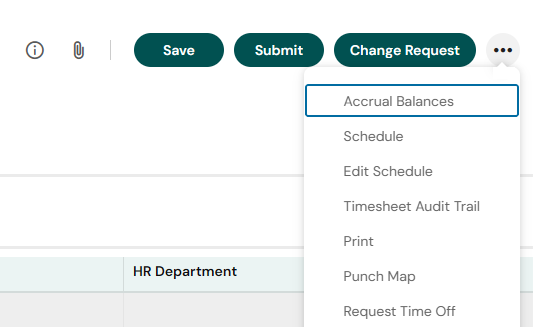
Timekeepers can now see the Timesheet Audit Trail and Time Off Audit Trail reports. You can search for either to find them. You can also see the Timesheet Audit Trail when on a Timesheet by clicking the “…” (screenshot below).
Report: Missed Punches – Informational
We are still working on getting you a full list of reports that mirror the genies that you had in Legacy Kronos. In the meantime, the Missed Punches Report is a useful tool to get started on reviewing timesheet entries for this week. Search for Missed Punches in your search bar to find this report. The report lists all Missed Punches, including those that may appear missed because the employee is still working the same shift. The Missed Punch spot and MP code attach to the timesheet when 14 hours have passed from the time of the last punch.
How to Remove Employee Birthdays and Employee Anniversaries from Tasks – Pending
We are working on documentation to show you how to remove or filter employee birthdays and employee anniversaries from tasks.
Leave Balances and Leave Submitted When Balances Not In – In Progress
We have identified the following issues and are working to correct them:
- Sick Leave balances for Full Time, Non-Hybrid employees are being incorrectly capped at 720 hours
- Sick Leave balances for Part-Time employees are being incorrectly capped
- Sick Leave Overflow for the Grandfathered Hybrid Employees (impacting 6 people)
- HRIS will manually switch leave that was submitted before balances were uploaded that are showing as LWOP – we are working to correct these.
- If the Department/Schools correct it directly to the timecard by reselecting the relevant Leave Cascade, that is also fine
- Example: Employee submitted 8 hours of Annual Leave before balances were in. Employee is seeing 8 hours of LWOP in lieu of Annual Leave on their timesheet. Timekeeper/Manager can (or HRIS is in the process of correcting) change the Time Off from LWOP in lieu of Annual Leave to Annual Leave and hit Save to retrigger the cascade.
If an employee comes to you saying that their leave balances are incorrect, please hold questions until next week while we work to correct these issues.
Additional Employee Access – Pending
All primary and backup timekeepers have access to their home and the Sub Department.
We are still working on additional access for folks to their Location and those who may transfer into their location.
- Completed– access to home department and substitute employees for Primary and Back-up Timekeepers
- Pending – access to the home location and those who transfer into a location
- Pending – access to those who manage specific Extra Duty selections
Work Schedules – Pending
We are working through the Rotating/Alternating Schedules/Compressed Workweeks that timekeepers have submitted to time@k12albemarle.org.
We will let you all know when those are in and available to use. If you have not yet sent us a rotating/alternative/compressed week schedule that is currently in use and needs to be built, please send it to time@k12albemarle.org.
FMLA / Worker’s Comp – Pending
We are still working on transferring current FMLA and Workers’ Comp cases from Legacy Kronos to UKG Ready. More information to come on how to handle these cases in UKG Ready.
Activities – Call Back, On Call – Pending
We are working on the documentation for how employees will request/designate on-call and call back. This is only for Non-Exempt, Regular employees. Primarily, only Building Services uses these functions. Ask your BP if you have questions about how On-Call or Call Back works.