Additional Employee Access and Backup Timekeepers – Updated/Complete
Backup Timekeepers – Additional Information
- Backup timekeepers can make corrections directly to the timesheet of anyone assigned to your Department (ADP Default).
- We have uploaded all timekeepers and backup timekeepers to their School’s Managed Cost Center. This means you should start seeing people who transfer to your school. You can see transfers under Timesheet > Current and they’ll have “View Only” next to them.
- If you don’t see an employee that has correctly Transferred to your Location:
- Wait until the next time the employee clocks in, that should refresh the timesheet and put it in your list
- Ask the primary timekeeper of the employee to click “Save” on the employee’s timesheet, that will also refresh the timesheet
- Email time@k12albemarle.org to click “Save” on the employee’s timesheet to refresh the timesheet
- If you don’t see an employee that has correctly Transferred to your Location:
- Backup timekeepers will not get a Things To Do for Time Off Requests or Change Requests. They can see pending requests under Time > Time Off > All Open or Time > Timesheet > Change Requests > Timesheet Change Requests (respectively). They will not be able to approve the requests, only the direct supervisor and primary timekeeper can approve requests (we’re looking to see if we can change this but have not found a solution yet).
- If someone with access (supervisor or primary timekeeper) delegates to a backup timekeeper, then the supervisor/primary timekeeper’s access will be transferred until the delegation period ends. The backup timekeeper will start getting the Things To Do for the Change Requests, but the supervisor/primary timekeeper will not. So, we encourage you to be aware of the implications of delegation and be sure you will not need access during the delegation period.
Access Summary:
- Complete – All primary and backup timekeepers have access to their School/Department based on default HR Department Cost Center (ADP Home Department) and the Sub Department (Group Access)
- Complete – All primary and backup timekeepers have access to employees who transfer into their Location – see additional info above (Managed Cost Center)
- Complete – Driver’s Ed and Homebound Extra Duty Managers have been completed. If you are an Extra Duty manager who needs specific extra duty access please email time@k12albemarle.org (Managed Cost Center)
- Complete – Indirect Supervisors can now approve/reject Time Off Requests. *But only new ones submitted after 1/16/2026.
- Indirect Supervisors can approve/reject under Time > Time Off > All Open then click the checkbox next to the relevant request and click Approve or Reject in the top right corner
- Indirect Supervisors can also approve/reject under Time > Time Off > Calendar
- Complete – Indirect Supervisors can now approve/reject Timesheet Change Requests. *But only new ones submitted after 1/16/2026.
- Indirect Supervisors can approve/reject under Time > Timesheets > Change Request > Pending Timesheet Change Requests. Then click the Filter and under Show click the checkbox “Data With Hidden To Do Items” and Apply. The requests should now appear, click the checkbox next to the relevant request and click Approve or Reject in the top right corner.
Submit Timesheets – Updated/Informational
Our original plan was to have an auto timesheet approval process take place. We have decided to change this process to allow for more time for review and correction, but also allow better reporting on employees who may not be reviewing their timesheets.
Supervisors and timekeepers can submit a timesheet on the employee’s behalf in order to approve the timesheet. Any timesheets that have not been approved or submitted by 1:00 PM on payroll Mondays will be approved/submitted by HR.
Report – Detailed Calculated Time (Counter Summary) – Informational
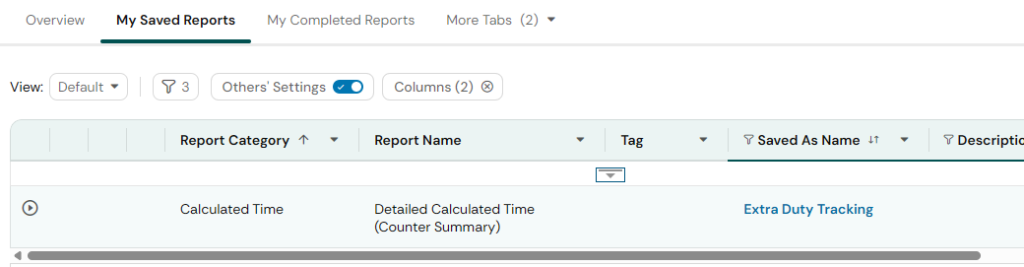
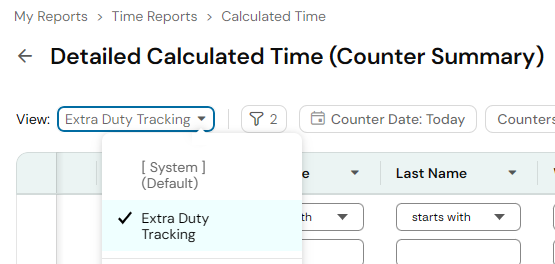
“Extra Duty Tracking” report has been shared with all timekeepers and managers. This report displays the extra duties and locations on employee’s timesheets. You should see any employee who transferred into an Extra Duty and also selected your Location. This report is based on employees who selected an Extra Duty. If you enter your school/department into the “Worked Location” column, you will be able to filter out subs who did not work at your school/department. The report defaults to “Today” you can change the timeframe by clicking “Counter Date: Today”
There are 2 ways to find this report:
- Option 1 – My Saved Reports – Go to Reports (on the main dashboard or under the hamburger menu) > click the “My saved reports” tab > click “Extra Duty Tracking” under Saved As Name column
- Option 2 – Switch View on Detailed Calculated Time (Counter Summary) report – Go to the “Detailed Calculated Time (Counter Summary)” report > click next to View and select “Extra Duty Tracking”
Timesheet Metrics – Fixed
We had an error affecting the timesheet metrics at the top of the timesheets late this afternoon. The error was caused by work we were doing on On Call and Call Back. This error is now fixed. If Worked Hours are still displaying incorrectly on a timesheet, click “Save” and it should refresh/correct itself.
Leave Balances and Leave Submitted When Balances Not In – In Progress
We have identified the following issues and are working to correct them:
- Sick Leave balances for Full Time, Non-Hybrid employees are being incorrectly capped at 720 hours – Done
- Sick Leave balances for Part-Time employees are being incorrectly capped – Done
- Sick Leave Overflow for the Grandfathered Hybrid Employees (impacting 6 people) – In Progress
- HRIS will manually switch leave that was submitted before balances were uploaded that are showing as LWOP – DONE
All leave balances except for the Sick Leave Overflow should now be correct. Extra Duty Limit Lists – Pending
We will be publishing a copy of the Extra Duty Limit Lists, how to look up the employee’s assigned limit list in ADP and UKG Ready, and how to submit changes to Extra Duty Limit Lists. – Pending
Long-Term Subs – In Progress
We are still working to upload all Long-Term Sub schedules to UKG Ready – In Progress
Work Schedules – In Progress
We are working through the Rotating/Alternating Schedules/Compressed Workweeks that timekeepers have submitted to time@k12albemarle.org.
We will let you all know when those are in and available to use. If you have not yet sent us a rotating/alternative/compressed week schedule that is currently in use and needs to be built, please send it to time@k12albemarle.org.
How to Remove Employee Birthdays and Employee Anniversaries from Tasks – Pending
We are working on documentation to show you how to remove or filter employee birthdays and employee anniversaries from tasks.
FMLA / Worker’s Comp – Pending
We are still working on transferring current FMLA and Workers’ Comp cases from Legacy Kronos to UKG Ready. More information to come on how to handle these cases in UKG Ready.
Activities – Call Back, On Call – Pending
We are working on the documentation for how employees will request/designate on-call and call back. This is only for Non-Exempt, Regular employees. Primarily, only Building Services uses these functions. Ask your BP if you have questions about how On-Call or Call Back works.